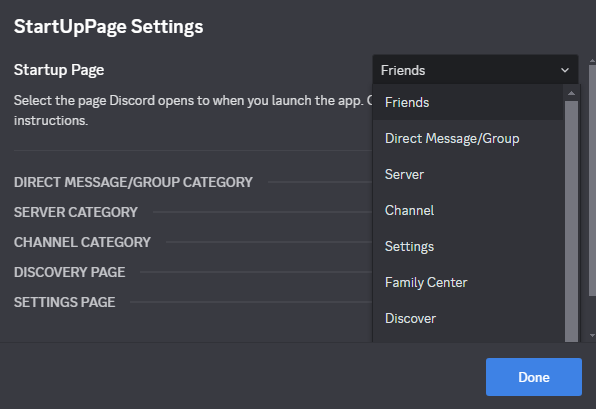
StartUpPage lets you choose which page Discord opens to on startup.
💡 If you find any bugs or have suggestions, please report them on my Discord server. 💡

- Select your preferred startup page from the "Startup Page" dropdown to customize where Discord opens on launch.
- For "Direct Message/Group," enter the Channel ID in the "Direct Message/Group Category" section.
- For "Server," choose a server from the dropdown in the "Server Category" section.
- For "Channel," select a server and enter the Channel ID in the "Channel Category" section.
- Save changes and restart Discord to apply your startup page.
- Enable Developer Mode (User Settings > Advanced > Developer Mode) to copy IDs by right-clicking users, servers, channels, or group DMs. Then select "Copy Server ID" for servers, and "Copy Channel ID" for channels, dms and groups.
Made with 💜 by @devevil/DevEvil#8745